We've all been there. It's 2 AM, the CI pipeline is green, and you ship your container to production feeling like a DevOps rockstar. Then Monday morning rolls around and someone discovers that your Dockerfile pulled a base image from some-dude-on-the-internet/totally-legit-node:latest. Oops.
In the age of AI-assisted development — where copilots are happily auto-completing your Dockerfiles and suggesting ADD instructions from URLs you've never heard of — securing your Docker build supply chain isn't just nice to have. It's essential. One rogue script, one compromised base image, one curl | bash from a sketchy domain, and suddenly your "microservice" is also a crypto miner.
This is where Docker build policies come in. Starting with Buildx 0.31.0, you can write .rego policy files that validate every single input to your Docker build before any instruction executes. Think of it as a bouncer for your Dockerfile — checking IDs at the door before anyone gets into the club.
In this post, we'll walk through what .rego build policies are, how they work, and — most importantly — two practical examples you can steal and adapt for your own pipelines. Let's go.
What Are Docker Build Policies?
Docker build policies are declarative rules written in Rego (the policy language from Open Policy Agent) that validate your build inputs before the build runs. When you kick off docker buildx build, Buildx resolves all inputs — base images from FROM, files from ADD or COPY, Git repositories — and evaluates them against your policy. If anything violates a rule, the build fails before a single instruction executes.
The key concepts are straightforward. Every policy lives in a .rego file alongside your Dockerfile, following the naming convention <Dockerfile-name>.rego. So if your Dockerfile is called Dockerfile, the policy file is Dockerfile.rego. If you use api.Dockerfile, the policy goes in api.Dockerfile.rego. Buildx picks it up automatically — no flags required.
Your project structure ends up looking something like this:
my-awesome-service/
├── Dockerfile
├── Dockerfile.rego
├── src/
└── ...
Every policy must start with package docker and produce a decision object that tells Buildx whether to allow or deny each input. The skeleton looks like this:
package docker

default allow := false

# Your rules go here

decision := {"allow": allow}
That default allow := false is crucial — it means "deny everything unless a rule explicitly allows it." This is the deny-by-default approach, and it's the only sane way to write security policies. If you don't have a rule for something, it doesn't get in.
Almost every policy also needs allow if input.local, which permits access to local files including the Dockerfile itself. Without it, Buildx can't even read your Dockerfile to start the build. It's the "you need to unlock the front door before you can check who's inside" rule.
How the Policy Engine Evaluates Rules
Understanding how Rego evaluates rules is key to writing good policies. Inside a single rule, all conditions must be true (logical AND). Across multiple allow rules, any match is sufficient (logical OR). So when you write:
allow if {
    input.image.host == "docker.io"
    input.image.isCanonical
}
...both conditions must hold: the image must come from Docker Hub and use a digest reference. But when you add another rule:
allow if {
    input.image.host == "ghcr.io"
}
...now an image from either Docker Hub (with digest) or GitHub Container Registry is accepted. Rego evaluates all rules in parallel — order doesn't matter.
The input object gives you access to metadata about each build input, and the structure varies by type: input.image for container images, input.http for files downloaded with ADD, input.git for Git repositories, and input.local for local file context. Each of these has fields you can inspect — hostnames, URLs, checksums, provenance attestations, signatures, and more.
Prerequisites
Before we dive into examples, make sure you have the right versions installed. You need Buildx 0.31.0 or later (check with docker buildx version) and BuildKit 0.27.0 or later (verify with docker buildx inspect --bootstrap). Note that this feature is currently experimental, so consider it an early-access power-up for your security posture.
Example 1: The Enterprise Registry Gatekeeper
Let's start with a scenario that every platform engineering team will recognize. You want to make sure that all Docker builds in your organization only pull images from approved registries, require digest references for reproducibility, and only download files over HTTPS. No more FROM random-person/mystery-image:yolo.
Here's the Dockerfile we want to protect:
FROM registry.company.com/base/node:20@sha256:abc123...
COPY package*.json ./
RUN npm ci --production
COPY . .
EXPOSE 3000
CMD ["node", "server.js"]
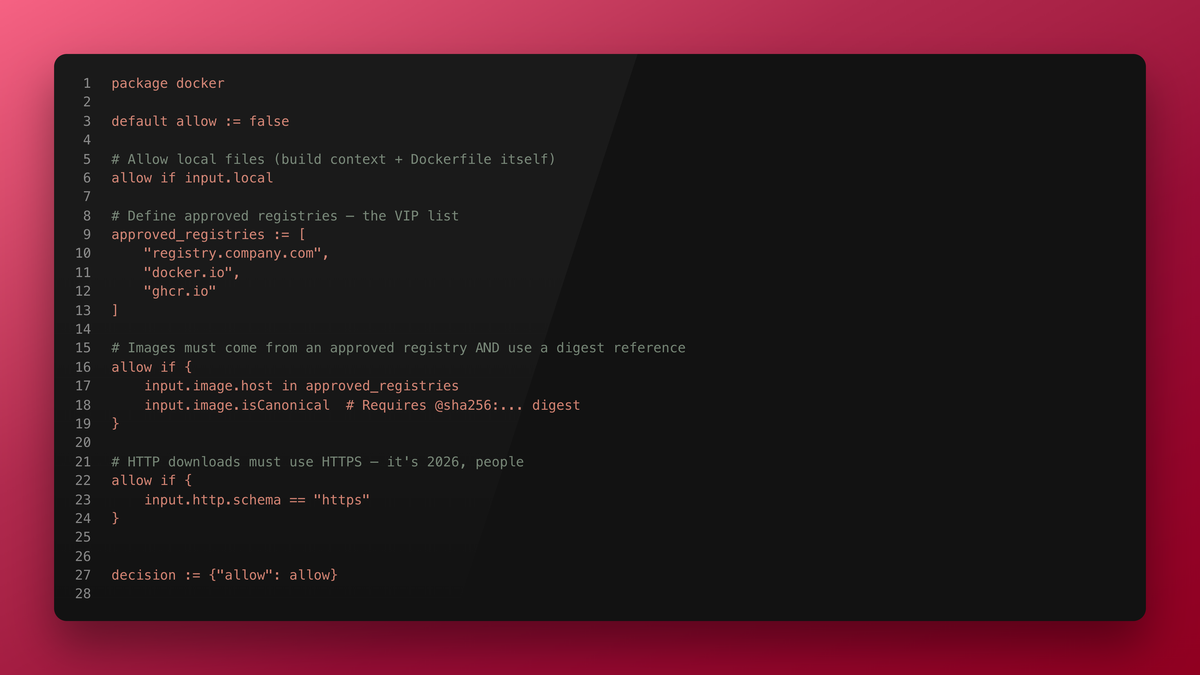
And here's the policy (Dockerfile.rego):
package docker

default allow := false

# Allow local files (build context + Dockerfile itself)
allow if input.local

# Define approved registries — the VIP list
approved_registries := [
    "registry.company.com",
    "docker.io",
    "ghcr.io"
]

# Images must come from an approved registry AND use a digest reference
allow if {
    input.image.host in approved_registries
    input.image.isCanonical  # Requires @sha256:... digest
}

# HTTP downloads must use HTTPS — it's 2026, people
allow if {
    input.http.schema == "https"
}

# Git repos are allowed (for multi-stage builds pulling from internal repos)
allow if input.git

# Helpful error messages so developers don't have to guess
deny_msg contains msg if {
    not allow
    input.image
    not input.image.isCanonical
    msg := sprintf(
        "Image %s must use a digest reference (e.g., @sha256:...). Tags alone are not allowed.",
        [input.image.ref]
    )
}

deny_msg contains msg if {
    not allow
    input.image
    input.image.isCanonical
    msg := sprintf(
        "Registry %s is not in the approved list. Allowed: %v",
        [input.image.host, approved_registries]
    )
}

deny_msg contains msg if {
    not allow
    input.http
    input.http.schema != "https"
    msg := "All HTTP downloads must use HTTPS. Plain HTTP is not allowed."
}

decision := {"allow": allow, "deny_msg": deny_msg}
Let's walk through what's happening. The approved_registries list acts as an allowlist — only images from these three registries pass the check. The input.image.isCanonical check ensures every image reference includes a @sha256:... digest. This means node:20 would be rejected, but node:20@sha256:abc123... passes. This is critical because tags are mutable — someone can push a completely different image to latest at any time, but a digest always points to the exact same content.
The deny_msg rules are pure developer experience gold. When a build fails, instead of a cryptic error, your colleagues see exactly what went wrong and how to fix it. That's the difference between a 5-minute fix and a 2-hour Slack thread.
If someone tries to build with FROM node:20 (no digest, Docker Hub), they'll see:
Policy: Image node:20 must use a digest reference (e.g., @sha256:...). Tags alone are not allowed.
ERROR: failed to build: ... source not allowed by policy
That's a much better Friday afternoon than "the build broke and nobody knows why." (Although "the build broke" is still a perfectly valid Slack status, let's be honest.)
Example 2: The Paranoid Production Lockdown
Now let's crank it up. This policy is for production builds where you need maximum supply chain security: pinned images with provenance attestations, signed Git tags from trusted maintainers, and every HTTP download verified against a known checksum. This is the kind of policy your security auditors dream about.
Here's a more complex Dockerfile this policy would protect:
FROM registry.company.com/base/golang:1.23@sha256:def456... AS builder
ADD --checksum=sha256:c0ff33... https://releases.internal.com/config-v2.1.tar.gz /config/
COPY . .
RUN go build -o /app ./cmd/server

FROM registry.company.com/base/distroless:latest@sha256:789abc...
COPY --from=builder /app /app
COPY --from=builder /config /config
ENTRYPOINT ["/app"]
And the corresponding policy (Dockerfile.rego):
package docker

default allow := false

allow if input.local

# --- IMAGE RULES ---

# Internal registry: require digest + provenance attestation
allow if {
    input.image.host == "registry.company.com"
    input.image.isCanonical
    input.image.hasProvenance
}

# Docker Hardened Images: trusted with digest
allow if {
    input.image.host == "dhi.io"
    input.image.isCanonical
    input.image.hasProvenance
}

# Docker Hub: only specific base images, pinned to exact digests
pinned_dockerhub_images := {
    "golang": "sha256:def456abc789...",
    "alpine": "sha256:4b7ce07002c6...",
}

allow if {
    input.image.host == "docker.io"
    some repo, digest in pinned_dockerhub_images
    input.image.repo == repo
    input.image.checksum == digest
}

# --- HTTP DOWNLOAD RULES ---

# Only allow downloads from approved internal domains with HTTPS
approved_download_hosts := [
    "releases.internal.com",
    "artifacts.company.com"
]

allow if {
    input.http.schema == "https"
    input.http.host in approved_download_hosts
}

# --- GIT RULES ---

# Internal repos: allow freely
allow if {
    input.git
    startswith(input.git.remote, "https://github.com/our-org/")
}

# External repos: require signed tags from trusted maintainers
allow if {
    input.git
    not startswith(input.git.remote, "https://github.com/our-org/")
    input.git.tagName != ""
    verify_git_signature(input.git.tag, "trusted-maintainers.asc")
}

# --- ERROR MESSAGES ---

deny_msg contains msg if {
    not allow
    input.image
    input.image.host == "registry.company.com"
    not input.image.hasProvenance
    msg := sprintf(
        "Internal image %s requires provenance attestations. Rebuild with --provenance=true",
        [input.image.ref]
    )
}

deny_msg contains msg if {
    not allow
    input.http
    msg := sprintf(
        "Download from %s is not allowed. Approved hosts: %v",
        [input.http.host, approved_download_hosts]
    )
}

deny_msg contains msg if {
    not allow
    input.git
    not startswith(input.git.remote, "https://github.com/our-org/")
    msg := sprintf(
        "External Git repo %s requires a signed tag from a trusted maintainer",
        [input.git.remote]
    )
}

decision := {"allow": allow, "deny_msg": deny_msg}
This policy is thorough. Internal images need both digest references and provenance attestations (proof of where and how the image was built). Docker Hub images are pinned to exact digests — not just "use a digest" but "use this specific digest." HTTP downloads are locked to internal domains only. External Git repos must have signed tags verified against a PGP keyring file (trusted-maintainers.asc).
The verify_git_signature function is a built-in that Docker's policy engine provides. You supply a PGP keyring file containing the public keys of trusted maintainers, and the engine verifies the Git tag signature against those keys. To set it up, export your maintainers' keys:
gpg --export --armor maintainer1@company.com maintainer2@company.com > trusted-maintainers.asc
Place that file next to your Dockerfile.rego, and you're in business.
Best Practices: Keeping .rego Rules Manageable at Scale
Writing policies is one thing. Operationalizing them across an organization is another. Here are some battle-tested patterns.
Keep your .rego rules in a dedicated, separate repository. This is the single most important organizational decision. Your policy repo becomes the source of truth for what's allowed in builds across all your services. Treat it like infrastructure code — with pull request reviews, CI checks, and a clear approval process.
Lock down access to the rules repo. Only a small, trusted group (your platform security team or equivalent) should have write access. Everyone else can read, but changes go through the same rigor as infrastructure changes. As the old joke goes: "In DevOps, we don't have a 'change management board.' We have pull request reviewers. Same thing, fewer donuts."
Your CI pipeline should clone both repos. When building a service, the pipeline clones the service repo and the policy repo, then uses the policy files during the build. A simplified GitHub Actions workflow looks like this:
jobs:
  build:
    steps:
      - uses: actions/checkout@v4

      - name: Checkout build policies
        uses: actions/checkout@v4
        with:
          repository: our-org/docker-build-policies
          path: .policies
          token: ${{ secrets.POLICY_REPO_TOKEN }}

      - name: Copy policy file
        run: cp .policies/production/Dockerfile.rego ./Dockerfile.rego

      - name: Build with policy enforcement
        run: docker buildx build .
Alternatively, provision rules directly on build agents. If you manage your own CI runners, you can bake the .rego files into the agent images or mount them from a shared volume. This way, policies are always present — developers don't need to think about them, and they can't accidentally (or intentionally) skip them. This is the "it's not a gate, it's a guardrail" approach.
Use --progress=plain for debugging. When a policy fails and you need to understand why, this flag shows the full evaluation trace — every input, every rule match, every decision.
docker buildx build --progress=plain .
Test your policies. Docker supports running Rego unit tests against your policies. Write test cases for both allowed and denied inputs. Your future self will thank you when you update a policy at 4 PM on a Friday and need confidence it won't break every pipeline in the company.
Why This Matters More Than Ever
Supply chain attacks aren't theoretical anymore. From the SolarWinds incident to compromised npm packages showing up in builds, the attack surface for containerized applications is growing. AI coding assistants are fantastic productivity tools, but they can also suggest dependencies and patterns that haven't been vetted by your security team. A .rego policy doesn't care whether a human or an AI added that FROM sketchy-registry.io/node:latest line — it blocks it either way.
Build policies give you a declarative, auditable, version-controlled way to enforce security constraints. They shift security left — not just to the developer's IDE, but to the build itself. And because they run before the build starts, they catch problems before any resources are wasted.
Wrapping Up
Docker build policies with .rego files are a powerful addition to your supply chain security toolkit. They're declarative, testable, and integrate seamlessly into existing build workflows. Whether you start with a simple registry allowlist or go full paranoid mode with pinned digests and signed tags, the important thing is to start.
Remember: in the world of container security, "trust, but verify" is outdated. The new motto is "deny by default, allow by policy." Your future self — and your security team — will appreciate it.
Now go forth and write some policies. And maybe pin that base image while you're at it. latest is not a version. It never was.
Build policies require Buildx 0.31.0+ and BuildKit 0.26.0+. The feature is currently experimental. For the full documentation, visit docs.docker.com/build/policies.



Comments ()